how to add related posts in blogger width html code

How to create related posts in blogger / how to add related posts in blogger. Related posts is a widget that is usually by the owner of blogger articles which are being installed under perform. related_posts contains some discussion of the post with almost the same as the currently displayed article. There are some models that are often shown on related_posts: related_posts showing only post title only, title and snippet display related_posts post content, related_posts by displaying the post title and post footage of images, there is also a display of pictures and only related_posts its title alone. To style the look related_posts, featuring style with simple, related_posts silder with style and more.

For those who want to try making related_posts in blogger, let's follow the guides make related_posts below:
-Login to blogger
-Open-edit template html
-code:
</head>
-Add the code above:


<style>
#related_posts {}
#related_posts h2{border-top:1px solid #F4F3F3;border-bottom:1px solid #F4F3F3;color:#222;font-size:13px;color:#222;text-shadow:white 1px 1px 1px;letter-spacing:0;line-height:20px;background:#C4C4C4;margin:0 0 5px;padding:5px 10px}
#relpost_img_sum{line-height:16px;margin:0;padding:0}
#relpost_img_sum:hover{background:none}
#relpost_img_sum ul{list-style-type:none;margin:0;padding:0}
#relpost_img_sum li{
list-style-type: none;
padding: 5px;
border: 1px solid #eee;
margin: 5px 0;
overflow: hidden;}
#relpost_img_sum .news-title{}
#relpost_img_sum .news-text{display:block;text-align:left;font-weight:400;text-transform:none;}
#relpost_img_sum img{
float: left;
margin-right: 10px;
display: block;
width: 72px;
height: 72px;
}
</style>
<script type='text/javascript'>//<![CDATA[
var relnojudul = 0;
var relmaxtampil = 5;
var numchars = 170;
var morelink = "";
var reljudul=new Array();
var relurls=new Array();
var relcuplikan=new Array();
var relgambar=new Array();
function saringtags(suchas,panjang)
{
var cuplik=suchas.split("<");
for(var i=0;
i<cuplik.length;
i++)
{
if(cuplik[i].indexOf(">")!=-1)
{
cuplik[i]=cuplik[i].substring(cuplik[i].indexOf(">")+1,cuplik[i].length)
}
}
cuplik=cuplik.join("");
cuplik=cuplik.substring(0,panjang-1);
return cuplik
}
function relpostimgcuplik(json)
{
for(var i=0;
i<json.feed.entry.length;
i++)
{
var entry=json.feed.entry[i];
reljudul[relnojudul]=entry.title.$t;
postcontent="";
if("content"in entry)
{
postcontent=entry.content.$t
}
else if("summary"in entry)
{
postcontent=entry.summary.$t
}
relcuplikan[relnojudul]=saringtags(postcontent,numchars);
if("media$thumbnail"in entry)
{
postimg=entry.media$thumbnail.url
}
else
{
postimg="https://blogger.googleusercontent.com/img/b/R29vZ2xl/AVvXsEiE2xqcumTH3vEVtGQ1UTaFbTGmZfbN0Ah1Y9oqsjk0tcR9NgWBtUaHLiR3S1_7r11F0oQvlPwdugHVhNq-XuUXop5DguDS8jgLumqYQpK759SV9Lp7m39OWEN3gyKfme2_wo8_AyqMImUI/s1600/relatedpost.jpg"
}
relgambar[relnojudul]=postimg;
for(var k=0;
k<entry.link.length;
k++)
{
if(entry.link[k].rel=='alternate')
{
relurls[relnojudul]=entry.link[k].href;
break
}
}
relnojudul++
}
}
function contains(a,e)
{
for(var j=0;
j<a.length;
j++)if(a[j]==e)return true;
return false
}
function artikelterkait()
{
var tmp=new Array(0);
var tmp2=new Array(0);
var tmp3=new Array(0);
var tmp4=new Array(0);
for(var i=0;
i<relurls.length;
i++)
{
if(!contains(tmp,relurls[i]))
{
tmp.length+=1;
tmp[tmp.length-1]=relurls[i];
tmp2.length+=1;
tmp2[tmp2.length-1]=reljudul[i];
tmp3.length+=1;
tmp3[tmp3.length-1]=relcuplikan[i];
tmp4.length+=1;
tmp4[tmp4.length-1]=relgambar[i]
}
}
reljudul=tmp2;
relurls=tmp;
relcuplikan=tmp3;
relgambar=tmp4;
for(var i=0;
i<reljudul.length;
i++)
{
var informasi=Math.floor((reljudul.length-1)*Math.random());
var tempJudul=reljudul[i];
var tempUrls=relurls[i];
var tempCuplikan=relcuplikan[i];
var tempGambar=relgambar[i];
reljudul[i]=reljudul[informasi];
relurls[i]=relurls[informasi];
relcuplikan[i]=relcuplikan[informasi];
relgambar[i]=relgambar[informasi];
reljudul[informasi]=tempJudul;
relurls[informasi]=tempUrls;
relcuplikan[informasi]=tempCuplikan;
relgambar[informasi]=tempGambar
}
var rangkumanPosts=0;
var r=Math.floor((reljudul.length-1)*Math.random());
var rini=r;
var relhasil;
var dirURL=document.URL;
while(rangkumanPosts<relmaxtampil)
{
if(relurls[r]!=dirURL)
{
relhasil="<li class='news-title clearfix'>";
relhasil+="<a href='"+relurls[r]+"' rel='nofollow'target='_top' title='"+reljudul[r]+"'><img src='"+relgambar[r]+"' /></a>";
relhasil+="<a href='"+relurls[r]+"' target='_top'>"+reljudul[r]+"</a>";
relhasil+="<span class='news-text'>"+relcuplikan[r]+" ... <span class='news-text'>";
relhasil+="</li>";
document.write(relhasil);
rangkumanPosts++;
if(rangkumanPosts==relmaxtampil)
{
break
}
}
if(r<reljudul.length-1)
{
r++
}
else
{
r=0
}
if(r==rini)
{
break
}
}
}
//]]></script>


-Phase one is complete, proceed again to find the code :
<data:post.body/>

-Add the following code below:

<b:if cond='data:blog.pageType == &quot;item&quot;'>
<div class='terkait-emakalahonline'>
<h2>Related : <a expr:href='data:post.url' expr:title='data:post.title'><data:blog.pageName/></a></h2>
<b:if cond='data:post.labels'>
<b:loop values='data:post.labels' var='label'>
<script expr:src='&quot;/feeds/posts/default/-/&quot; + data:label.name + &quot;?alt=json-in-script&amp;callback=relpostimgcuplik&amp;max-results=50&quot;' type='text/javascript'/>
</b:loop>
<ul id='relpost_img_sum'>
<script type='text/javascript'>related posts();</script>
</ul>
</b:if>
<script type='text/javascript'>
removeRelatedDuplicates();
printRelatedLabels();
</script>
</div>
</b:if>

-Save The Template
how to create a table of contents in blogger

How to create a table of contents in blogger. Once we have a blog with contains some content of course we hope that the content can be found and visited by the seekers of information. The more posts that we make is certainly more difficult to search the entire contents of an existing post:. One way to see the whole content of the post is to add a table of contents. To add a table of contents, then the entire contents of the post can be shown, so the table of contents page by opening the entire post content will be visible. Like we opened a book, in the book always noted the table of contents is useful to search the contents of the book.

Well, here are the steps to create a table of contents on the blog:
If you are already logged in to blogger? If not please login.
Open The Page
New Page
Write the title of the "table of contents"
Write a little introduction if you want
Enter The Code:
goo.gl/TaH7dP
Replace: bloggermendalo.blogspot.com into your blog page
Save

see demo :
bloggermendalo.blogspot.com/p/sitemap.html

After successfully making a list of the contents of the blog, then continue by adding a table of contents link to the Navigation bar. This is to make it easier if the table of contents will open the blog

bloging techniques for beginners

A variety of reasons which cause a person to make a blog and manage it. The reasons include: the media serve as the blog promotion, blog is used as a medium for disseminating information, sharing experiences and knowledge, and others. Among blog owners certainly have different reasons. Every blogger should always study the progress and development of the blog, this is needed because it can eventually facilitate us in the management of the blog so that it can achieve the goal of making the actual blog. To manage the blog takes a lot of sacrifice including time, thought and effort.

This article will discuss about how to manage a blog should be:

1. Learn to achieve a successful Blogger


The simplest way that can be used by novice bloggers is to achieve a successful Blogger is always learning about blogging by visiting other blogs who Blog a success. By visiting the blog then would arise some inspiration to build blogs, improve blog blog in order that we have become more perfect, whether it's writing style, look or any other thing.

2. Make the most of your internet network
To create and manage a blog needed the internet network. After you successfully create a blog and start to manage it, try to take advantage of the internet to learn about the important things in the blogging techniques, how to attract visitors, how to let cozy pengungjung see our blog.
To learn about other blogs it takes a lot of sacrifice, such as the time taken only to learn why and why. Once we understand this, then we try to apply our own blog.
What should we learn to build your blog?

3. Promote your blog

After successfully managing the blog and felt already worth a visit simply because blogs people give a little information that can be useful to your visitors, try doing a blog promotion. By doing blog promotion, at least a little or a lot of will to blog traffic. With the ever increasing blog traffic is certainly the spirit we are to manage the blog grew.

4. Blog Updates
Although the above three things you've done, and get maximum results but in order to remain in the position of blog is expected, however the information you presented on the blog need to keep updated. "By doing an update on the blog, at least we've given new things on his blog. So the blog visitors always visit do not feel bored because of the new information available to them.

reason create a blog using blogger

Lately the blog is getting increased, so did the service provider's facilities to make blog currently we cannot count them, with a wide range of features and amenities offered.

If we look to the past, a very famous blog providers only two, namely: BlogSpot and wordpress. Both can be used for free, just for wordpress there are two versions namely the premium version and free version. For the free version we can directly use it without doing an install on hosting, but free version cannot monetize. Another case with bloggers, although free we can monetize on the blog so we can get revenue from the blog that we have made.

Why should create a blog at blogger?
Here is the reason why we create a blog on blogger.
1. easy
Create a blog on blogger is very easy, the process to create a blog on blogger just takes a few minutes, and a few steps away.
For a guide to create a blog in BlogSpot post can be seen in the past.
2. Adjustment of the blogger Template
Blogger template customization is very easy to either change the template or do a custom template on there
3. Connect with your Google account
The third reason why using blogger is a blogger account: connect with all your google account consists of: Web Search, Bookmarks, Google Mobile, Google Chrome, Mobile, Search for mobile, Maps, Ad Sense for mobile, AdMob, The Digital Garage, Books, News, Image Search, Video Search, Maps, Earth, Custom Search, Trends, Scholar, Gmail Drive, Docs, Sheets, Slides, Forms, Drawings, Sites, Calendar, Translate, Google + Blogger, Groups, Hangouts
4. quickly Google Indexed
Why blogger Google indexed faster? create a blog using blogger will be indexed faster by Google because of bloggers have linked to google. What is clear, is one of the bloggers own Google
5. Custom domain blogger
When we create a blog on blogger, we can also do custom domain by renaming the blogspot domain name com, net, org, and others with no make changes to the content of the blog. The domain can be obtained by purchasing a domain provider. For a guide to custom domains can be found in posts that have been then.

That's some of the reasons why I chose blogger, if had a reason to use other bloggers that I would add.
Because the night is already late, eyes already sleepy and tomorrow should work. So quite here yet, hopefully another time can be dialed again

Top Beginner blogger tips

Top Beginner blogger tips. When we as a novice blogger, it would have been very much to learn to set about developing a blog, start from the bottom up to monetization. Sometimes we feel free to do the work of the blog, since it has an awful lot of blog-a blog that has been popular and has had a lot of visitors. But in my mind there's a whisper why should hesitate, because the more we learn about and practice the more opportunities to us. What are the odds? The odds get visitors, opportunities to share knowledge, opportunities for information sharing and no opportunity to make money from your blog. Like we'll open up the store offline, in addition to a lot of stores have left right what we might be able to go forward. When we dare not start open the store then store until whenever we would not go forward. Why? Because we have not yet begun.

After such a day I have this Blogger Mendalo, there are some things that I can to help learn blogging.
What are the blogging Tips?
1. Specification of the Blog
Before you create a blog, you must determine the specification of the blog, whether it's a personal blog, company blog, blog or other online store

2. Optimize your Blog
The blog has been completed, the blog has been neatly arranged, the blog but the blog contains articles has never visited by one, except our own.
To cope with all this, surely we have to follow the stages of how to blog received a visit. This may be done with the way did submit it to search engines, submit sitemaps and other ways to optimize your blog.

3. Development blog
Once we have a blog, surely we should always fill the blog with the posting-posting an article or image in accordance with the specifications of the blog. So that way our blog more and more contents, with more and more blog content certainly is getting many of the benefits generated by the blog. Perhaps the post there are a few posts that are not at all by any man, but do not feel disappointed because it might post a post that many other views by visitors. Like we are selling, there are a few items that we sell but never was asked by one person-.

4. Do not get bored
We as human beings have certainly there are boredom. To avoid this, when you feel a little bored, try you visit multiple blogs with the same theme. Then from there you will get some motivation to continue blogging.
"Why such people can blog but my blog is not" with thought like that then we will be motivated back to blogging.
Or it could be by the way: If your blog with the theme of "Blogging" then make a blog more specifically you use to learn. The biased blog you use to learn to change theme, change the display of learning, learning html, you have to love that work then the boredom you will be lost. And the spirit of blogging you'll grow back.
OTHER TIMES ATTACHED. ...

how to add image in blogger post

How to add image in blogger post. How to add image in blog posts is actually very easy, but very difficult for novice bloggers. when we see some blogs belonging to the bloggers who are already proficient, usually in a post they are always adding pictures to complement the content of the post. moreover, if the post is a post about the guide or post sale of goods. even those able to decorate it pictures in posts with a particular effect.
on this post blogger Mendalo will give a guide how to add image in blog posts.

What do i need to be prepared to add a picture in a blog post?
that need to be prepared to add pictures on a blog post are articles and images.
let's say you currently have to write down the title and content of the article on the page posts, and live add images in a post.

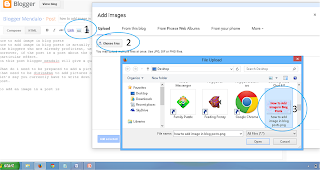
To add an image in a post is:
-place the cursor where you want to put the picture.
-Click on the insert image icon
-If the insert image page appears, continue to click Choose file
-Find the picture that you want to add
-Click open then Add selected
how to add image in blogger post

You have successfully added a picture on the blog post, after successfully adding the image now is the time we do the optimization on the image so that the image be seo friendly.
How to optimize image on the post to be seo friendly is:
- change mode post be compose
-Click on the image, and then click properties
-After performing image properties menu, then enter Title_Text and Alt_Text
-OK

Let's see how to optimize image on the blogger post to be SEO friendly
how to optimize image on the blogger post to be seo friendly

How to make a blog on blogspot

Create a blog a blog is one job that is easy to do, especially if we create a blog on blogger. Through several steps we have to have a blog and would have online.
On this post Blogger Mendalo will explain in details about how to create a blog from scratch until to the other settings until the blog appear attractive.
What is a blog?
A bit let us know what is a blog? Understanding blog according to the Wikipedia website, a blog is short for web log, said web logs in this case to name an application the website contents are likely to be shaped on text, text and or articles in general text or text displayed in the form of a sequence starting from posts/recent posts to post/the longest inscriptions which have been published on his blog.
The goal of making the blog a blog, be it the free version or the paid version is the blog as a means to share, share information, share knowledge sharing, share the experience. This blog is also widely used as a means of online business. Information obtained from many, many States that by using the blog has a lot of that can be monetized through Monetize provided by google.
On the above article we have gained one explanation that blogs can be created in blogger/blogspot. But actually the blog not only can create a blog on blogger, but can also be made using multiple platforms, including: Wordpress, Weebly, Blog dot com, and many more others. But according to blogger Mendalo the most easy is to create a blog on blogger.

To have a blog of course we have to go through several stages in making it, and the following Blogger Mendalo will try to explain the stages in making blog:

1. Preparation phase
To create a blog surely we are required to have an internet network the following devices and equipment computer used, and another power to turn on the computer. There are network devices and the internet, if there is no electricity then make will not be resolved.

2. Have an email
How to create a Gmail account. After we passed the stage of preparations, then we are required to have an email, if it turns out you don't have email then we must first create the email.
To make email easier, so please use Gmail, because if we create a blog on blogger, with just one login then we will be able to easily manage the blog and also easier to check incoming email on Gmail. But it doesn't hurt also if we use email in addition to Gmail.
There may still be a visitor of this blog who feel difficulties to create an email in Gmail, than that will be described below in brief.
To create an email,
Please go to Gmail.com
Continue by clicking Create an account
Please use the form provided in accordance with your data
Name:
Choose your name:
Create a password:
Confirm you password:
Birthday:
Gender:
Mobil phone:
You current email address:
And other fields. Please follow the steps. Because if it is described here, the post would be too long.
If there is still Trouble in the making of a Gmail account, please ask you via the comments field.

3. Create a blog on blogger
How to create a blog on blogger. After we go through 2 stages above, let's move on to the third stage, namely to create a blog on blogger
The blogger is not difficult to make, please type the first blogger/blogspot, afterwards you will be presented a menu of login, login with your email and password if your position is not logged.
Once we have successfully logged in, then it will usually show up a menu of options the use of identity profile, in this option we can select one profile or profile Google + Blogger. If it is, click continue to continue with bloggers
After that we'll see a blog creation page, click Create a new Blog
Proceed by filling in the columns that are available on the Create a new blog page, i.e. with filling:
-"Title" in that column you can enter the name of your blog: e.g. Blogger_Mendalo
-"Address" in the column that you can fill with your blog's url, such as bloggermendalo (without spaces), make sure the url you typed is not yet there are people who create blogs with URLs, because if it is there then you cannot make a blog with the url.
-"Templates" on the template, you can choose the style and look of the template has been provided, please scroll down to see it.
-If it is, continue with the click Create blog!
-Good luck and I congratulate, you already have a blog

 
4. Make a post
How to create the post in blogger. Now you have gone through 3 stages that have been completed, and you already have a blog with a steady look. But your blog is very unfortunate yet contains the posts, why not yet contain the posts? The answer: Because the blog was just created.
To make a post on blogger is very easy. That is, it is enough to click "New Post" then fill the post title and post content also is required, proceed click Publish.

5. Submit blog to search engines
How to submit blog to search engines. You now have a blog and have after following the fourth stage, then you have also have a post on his blog. But unfortunately, this time your blog has yet to be discovered by the search engines, because you haven't done submit blog to search engines, especially google
From it lets follow the steps submit blog url to google.
To work on submit blog url to google first, please type in the add url on the search engines, and then locate the Submit URL – Google, then enter your blog's url e.g. bloggermendalo.blogspot.com and click Submit Request. Then do verify by entering the code verify that exists in google wbmastertool to your blog. Or it could also do verify via email. If the forefront has been selasai and success, then wait a few days your blog will be found by search engines. It's just that I do not know on the blog to many sequence can be found.
More clear regarding this discussion, you bias found in other posts on the blog Blogger Mendalo.

6. Create interesting blog
How to make an interesting blog. To make your blog interesting, you appear biased conduct by changing the color of the template, change the look of the template, or replace templates that already made it interesting.
If you want to explore about the blog, we recommend that you do not change the template that is already made attractive by others, but you have to work on your own how to display your blog become more interesting, because in this way you gain a lot of knowledge.
A little secret so that I will have to blog to appear attractive. To change the color of the blog, you can simply do a custom template in the Template section > Customize. On that page you can change the appearance of color blog, size and type of font, font color, lay out, backgrounds and also you can add css to your taste

7. Make Money From Blog
How to Make Money From a Blog? In this section you can do after your blog actually get visitors, because of visitors that our blogs will be able to make money. If the blog does not have visitors how probably will be able to earn an income. So that the blog has a lot of visitors, of course, our blog has a very good SEO positions, because with a good SEO, then the blog will be found by seekers of information through search engines.
Then how can I make the blog can be found by seekers of information through search engines?
This course should have some of our blog posts, and post-the post is a unique article, that article can occupy a good search engine position. Say, when we type in "how to create a blog on blogger" on a search engine, then our post about "how to create a blog on blogger" will appear on the first page of the number 1 search engine. If there were 1000 people who search for information by typing in how to create a blog on blogger, then there are at least 10 people who open the pages of our blog. Good luck, if 1000 people that everything is opening up how to create a blog on blogger on our blog page. Fingers crossed.
Back to Make Money From Blog. Specifically for blogs that are created on the blogger, the blog owner can easily earn revenue via the blog with how to register a blog on Google AdSense, certainly after following the rules given by Google AdSense. To make money from Google AdSense that we have to do is just put ads from Google AdSense on the blog. When Google AdSense ads can be mounted on a blog? After we were accepted into the Google AdSense publisher.
What are the requirements for being a Google AdSense publisher? To make it more clear, please look at the official page of Google AdSense.
There is one more question. Does this blog have become publisher AdSense?
When I made this post, Blogger Mendalo not yet registered into the Google AdSense publisher. Hopefully in the near future I will register this blog into Google AdSense publisher and with the hope that the Google AdSense team can take it. Please prayer that this blog could be a Google AdSense publisher best.

So a post about How to make a blog on BlogSpot, hopefully this post can provide benefits to many people around the world. One message for you, before leaving this page please