Showing posts with label how to add. Show all posts

blogger custom domain not working without www

How shocked, when we managed to do a custom domain bloggers but when you try to access it without the www domain, the domain has been successfully gives a chance to the blogger but the domain can not be opened. Are there still domain custom error settings on bloggers who have completed? To ascertain whether or not there is an error in the custom domain, we can try to unlock the domain by using www. If the domain can be opened using www, meaning work domain custom settings you have made it, but there are still shortcomings. Any drawbacks? The drawback is the domain can not be accessed without www.
Before continuing the discussion about "blogger custom domain not working without www", it helps us try to repeat how to perform a custom domain in blogger?
To perform a custom domain in blogger is:
- Get a domain by way of purchase or you can also get a free domain at freenom.com or premium domain

Free domain
If there are free, why should you pay?
To have a free domain you can get on freenom.com. In freenom.com we can obtain a free domain with the extension dot tk ml dot, dot ga, cf dot and dot gq, especially for dot com, dot net, dot org, dot biz, dot info, dot eu, dot nl, dot tv, dot cc and more we are still obligated to pay the price varies.
How do I get a free domain at freenom.com
To get a free domain is done by opening the freenom.com then type the domain name that you want, if it is not already used by another person, then you can have it.
After you type a domain name that you want, and then click Get Now, and then click Check Out, specify a longer period of use of the domain, and then click continuously, proceed to login to freenome.com if you are already registered in advance, and if it does not mean you have to do Signup on freenom.com

Premium domain
To have a premium domain, of course, you have to buy the premium domain provider

- Blogger custom domain
There is some work to be done to make a custom domain blogger. (Think of it this time we do kustpom domain obtained from freenome.com)
(A) Login to freenom.com
(B) Save My domain> My domains> Manage DNS Freenom. On that page there are several fields that must be filled
In the column name: empty course, on the choice of type: select A, the contents of the column TTL 14440, on the target, the contents of which are under the ip 216.239.38.21, 216.239.32.21, 216.239.34.21, 216.239.36.21.
Ip over ip above consists of 4 pieces, then you must enter the ip on the 4th row
In the 5th row you must enter a verification code that bloggers can be obtained after setting up a custom domain in blogger.
To be more clear, please refer to the table below:


Name
Type
TTL
Target

A
14440
216.239.38.21

A
14440
216.239.32.21

A
14440
216.239.34.21

A
14440
216.239.36.21
www
CNAME
14440
ghs.google.com
987654321abcdef
CNAME
14440
Ab-cdefghij12345
6.googlehosted.com


How do custom domain in blogger?

- How to custom domain in blogger is:
- Login to blogger
- Settings
- Click EDIT on the Blog Address, and then enter your domain name, and then save it. Once you have saved, it will appear verification code that must be entered in the column of the 5th and 6th columns. For options Type, you must select CNAME

Let's just work on blogger custom domain has been completed and successfully opened the blog by using www. Think of it as the domain with the name howtoadd.ga. So we open the url www.howtoadd.ga, very clear that we are open url is www.howtoadd.ga. So what if we open without using www ie howtoadd.ga. Well, turns domain could not be opened and displayed an error message.
404. That's an Error

In accordance with the above post title "blogger custom domain not working without www", then it is time we discuss how to solve the problem.
To overcome the problem of "blogger custom domain not working without www" is as follows:
- Login to blogger with your email and password
- Click Settings > Basic
- On the Settings page > Basic, there are several sections, please find Publishing-Blog Address
- Click the EDIT on the right side of your domain name
- Put a stain on Redirect domainname to www.domainname
Example: Redirect howtoadd.ga to www.howtoadd.ga
- Continue to click SAVE
- If you have, please try opening your domain without the www (eg: howtoadd.ga) Remember, without www
Good luck. And the great expectations of the author, after you read the post "blogger custom domain not working without www" is expected to leave a comment, so that authors can find out the extent where the benefits I worked hard to make this post.
how to add custom domain to blogger

how to add custom domain to blogger. A few months ago I managed to make this blog with the name of the Blogger Mendalo exactly with the url bloggermendalo.blogspot.com and I have had a few posts. In August I made a post numbering 10 posts, in December 2015 amount to 2 posts, in January 2016 totaled 18 posts and February until this post made amounted to 9 posts. So the number of posts that have been made on this blog amounts to: 10 + 2 + 6 + 9 = 39 posts.

While not being relaxed, I try to have a look at the features bloggers, there is a written Earnings, I was curious and question: why there is a menu of Earning? What is Earning? Finally trying to figure out how to read with tau Help menu that is on blogger and also look for tau from some forum. Oh, it turns out that often touted Google Adsense. After a bit I finally figure it out try to do Signup with how fill out the form provided on google adsense and following all the requests, it was precisely on 6 February 2016. After successfully performing a Signup on Google Adsense, a few moments later I get a reply from emali Google Adsenese with the heading Payment contact information changed. After that I tried to login to Google Adsnese and I follow the instructions so that the Adsense ad code has been installed at Blogger_Mendalo. Heart felt excited because a adsense ads seen on Blogger_Mendalo, I thought, Wow blogger_Mendalo will succeed and will earn, but then some ads no longer appear. Finally I tried to search it turns out oh know, new stages of review and is heading on a second review.

With great hope and anxiety, I wait the end on February 12, 2016 I get an email from Google Adsnese Team with the heading "Google AdSense Account Status" my heart very happy. Then I open the email titled "Google AdSense Account Status", the surprise after looking at the contents of the email turned out to contain a refusal because the offense has been doing with the reason "content does not have enough text." I am still confused looking at the reason for this, what is a "content does not have enough text" though this blog contains articles in the form of text, and the article is really my own reef. The way that I used to make this article is: I write down everything once I managed to do it. The example I created the article "Create blogger accounts", I recorded every step I am working on creating a blog and after successfully making it I continue with making up words to my posts on this blog. Example a posing, titled: "Top Beginner blogger tips" after I managed to create a blog and make some posts I think this blog is about the journey, eventually arise an inspiration and I continue with the fabricated words finally managed to make a post "Top Beginner blogger tips". Yes already, forget about it all. The most important is how to keep this blog can be useful for those who read it. After I successfully working on a custom domain on blogger, this time I want to share it to anyone managed to find this blog.

After being rejected for the first time to register on Google Adsense, I try to study again and thank God I have been getting a bit of a science that is doing the custom setting on a blogger becomes a free domain. Why I choose free, because there is no funding to buy premium domains.

I gain a free domain at freenome.com
Type the desired domain names at freenome, for example howtoadd
After typing in howtoadd, then below there are several options: howtoadd.tk, howtoadd.ml, howtoadd.ga, howtoadd.cf, howtoadd.gq. When I do a request howtoadd, only the howtoadd.tk can not be selected, because the howtoadd.tk have owned the man and I decided to choose howtoadd.ga
Do signup with email
If you've managed to get a domain name and have been active, do the settings on blogger and freenome
For settings on blogger:
Login to blogger
Go To Settings-Basic
Discover Publishing, below there are the Blog Address
Click on the + to Set up a third-party URL for your blog, then comes the text of the Third-party domain settings below there is a column of the http://blog domain. Type the name of the domain on the column by adding the www, e.g. www.howtoadd.ga
Continue with the SAVE, click after it would appear the code ERROR and give an explanation that there is some verification code must be copied and then placed on the page setting of DNS Record freenome

If you've finished putting the code in the freenome setting, please come back again to the blogger settings page and then click SAVE again, if the error message does not appear, it means you have successfully done a custom blogger domain to your new domain. And now you can access your blog with the new domain name. Example: for bloggermendalo. blogspot, can now be accessed by www.howtoadd.ga

Hopefully helpful

how to add more gadgets to blogger

how to add a widget to blogger / how to add more gadgets to blogger. The Widget/Gadget is one of the important existing elemet on his blog. The placement of the widget can be customized according to the needs and tastes of the blog owner, but the placement of the widget to be appropriate to its location that visitors do not feel bothered by the widget has been installed.

Specifically for blogger widget addition element contained in the layout. By default, an awful lot of widgets that have been provided by blogger, which can be added to blogger edit html without doing, simply with a few clicks on the layout then the widget can be installed on your blog.

Any widget that has been provided by blogger?
The grouping widget on blogger there are three parts:
- Basic
- More Gadget
- Add your own

In the section on basic currently there are 29 widgets are:
1. AdSense
2. Featured post
3. HTML/JavaScript
4. Profile
5. Blog Archive
6. Page Header
7. Image
8. Labels
9. Pages
10. Link List
11. Text
12. Popular Posts
13. Search Box
14. Blog's stats
15. Video Bar
16. Blog List
17. Follow by Email
18. Feed
19. Slideshow
20. Logo
21. Poll
22. Subscription Links
23. +1 Button
24. Translate
25. Newsreel
26. List
27. Google+ Followers
28. Google+ Badge
29. Attribution

On the more Gadgets there are 929 widget:
1. Contact Form
2. Wikipedia
3. Share It
4. Sign In
5. Fish
6. The Daily Puppy
7. My AddLibra Bookstore
8. Pictures of Sharks
9. The Legend of Zelda
10. Latest Song - Keri Hilson
11. FOCUS Online - Nachrichten
12. Byte Converter
13. 007Clock
14. Pictures of Aurora Borealis
15. Michael Jackson Quotes
16. Orologio Digitale
17. The World's Healthiest Foods
18. Mike Tyson Quotes
19. Pictures of Military Jets
20. Ronald Reagan Quotes
21. Deutsche Bahn
22. POWr Poll
23. Aktuelle Nachrichten
24. isango tours trips
25. Pete The Penguin Virtual Pet
26. DJIA RealTime-sem delay
27. Sustainable Seafood
28. POWr Resume
29. Virtual Girlfriend
30. Followers, and more please see in blogger add widget menu


How do I add a widget in blogger?
Here's an easy way to add widgets in blogger.
-Let's login to blogger
-Layout
-Add a Gadget
-Select a widget to be added, for example, you will add popular posts, then click the plus sign beside a popular post, perform a configuration if requested.
-SAVE
-Save Arrangement

how to add image in blogger post

How to add image in blogger post. How to add image in blog posts is actually very easy, but very difficult for novice bloggers. when we see some blogs belonging to the bloggers who are already proficient, usually in a post they are always adding pictures to complement the content of the post. moreover, if the post is a post about the guide or post sale of goods. even those able to decorate it pictures in posts with a particular effect.
on this post blogger Mendalo will give a guide how to add image in blog posts.

What do i need to be prepared to add a picture in a blog post?
that need to be prepared to add pictures on a blog post are articles and images.
let's say you currently have to write down the title and content of the article on the page posts, and live add images in a post.

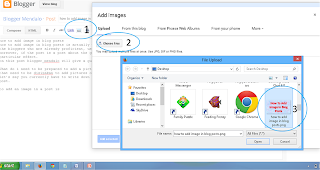
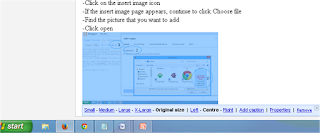
To add an image in a post is:
-place the cursor where you want to put the picture.
-Click on the insert image icon
-If the insert image page appears, continue to click Choose file
-Find the picture that you want to add
-Click open then Add selected
how to add image in blogger post

You have successfully added a picture on the blog post, after successfully adding the image now is the time we do the optimization on the image so that the image be seo friendly.
How to optimize image on the post to be seo friendly is:
- change mode post be compose
-Click on the image, and then click properties
-After performing image properties menu, then enter Title_Text and Alt_Text
-OK

Let's see how to optimize image on the blogger post to be SEO friendly
how to optimize image on the blogger post to be seo friendly

Adding read more to blogger posts

As a beginner blogger like me, make readmore on the blog post is not easy. As with the bloggers who have advanced, various styles and and forms readmore they can they can make, ranging from read more to blogger with thumbnails, read more auto bloggers, animated read more button bloggers, read more image bloggers, read more button in blogger, read more with script code, read more just looked title, and how to make other readmore.

What is read more bloggers?
Read more is one of the beheading of posting an article on blogger whose function is to minimize the look on a page posting so that the post is not seen as a whole without having to click on the word "read more". By adding readmore on each post so if we open on its home page on the blog, the blog blog posts are only visible piece of sentences.
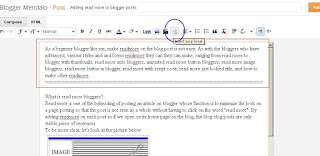
To be more clear, let's look at the picture below:
Adding read more to blogger posts
To make readmore the easiest blogger, in this case the sign edit html in blogger template is:
- How are you've logged into blogger? If not we log into your account mai blogger
- Create a new post, tulisah title of the post, and post content.
- Change the mode of posting of html to Compose
- Determine where you would have cut the sentence by way of placing the cursor, and then click Insert Jump break, please see the picture:

Adding read more to blogger posts

Caption readmore:
> The blue circle is the button that must be clicked to display readmore
> Blue colored box is displayed on the sentence that area readmore

- Continue with a click Publish
Have a look, your post has been truncated to read more.
You must have opened this post, where the comments you ....?

How to add blogger description in header blogger

Blogger Description is a short description of the content of the blog, about what the content of these blogs, talking about what the blog. Description of the blog is also very influential on seo, usually to improve seo blog, in addition to putting on the blog description header blog owner is also required to add meta descripsi blog on blogger template.
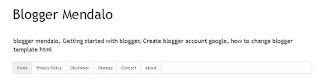
For this time we will discuss on the blog to add a description in the header. please see the example in the results in the following figures:
How to add blogger description in header blogger


To add a description to the header is Blogger;
- As usual, must login to blogger
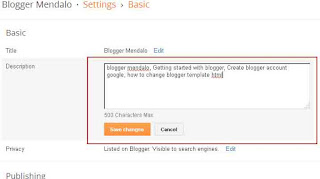
- Go to the Settings> Basic
- Find the description, and then click Edit, after click edit then would appear an empty city. nah, that's where we fill the blog description that will be displayed on the blog header
How to add blogger description in header blogger

- If you have, please click SAVE

to add meta descriptions on the blog template is
- You are still in a position login
- Open the template, edit html
- Discover the code & lt; head & gt;
add the following code below:

& lt; meta content = "blogger mendalo, Getting started with bloggers, bloggers Create a Google account, how to change blogger template html 'name =' description '/ & gt;

Save the template